Launching a website for your business is a huge milestone. But many small businesses make the same mistake: they treat their website as a one-time project instead of an asset that needs regular attention. In reality, every website requires maintenance to stay secure, fast, and functional.
Without consistent monthly maintenance, websites gradually develop problems like security vulnerabilities, broken elements, slow loading, outdated plugins/software and more.
This guide explains exactly what small business website maintenance involves, how often it should be done, and whether you should handle it yourself or hire a professional service. By the end, you’ll also have a simple maintenance checklist you can follow to keep your website running smoothly year-round.
What Is Small Business Website Maintenance?
Website maintenance is the ongoing process of monitoring, updating, and improving a website after it has launched. For small businesses specifically this typically includes: software updates, security monitoring, backups, updating content, optimizing performance, and checking SEO health.
You should think of website maintenance like routine service for a vehicle. Without regular upkeep, problems accumulate until the site becomes slow, insecure, or unreliable. Regular maintenance ensures your website continues to support your business goals, whether that means generating leads, selling products, or providing customer information.
Why Website Maintenance Matters for Small Businesses
For many companies, their website is the primary way customers discover and interact with the business. That makes reliability critical. If there is incorrect information or elements that don’t work correctly, it’s going to give a bad impression of your business. Neglecting maintenance can lead to serious issues such as:
Security Vulnerabilities
Outdated software is one of the most common ways websites get hacked. Updates patch security holes before attackers exploit them. Even if you don’t accept credit cards or have “valuable” information, your website can still be targeted.
Lost Search Rankings
Search engines prioritize websites that are fast, secure, and regularly updated. A neglected website often loses visibility in search results to competitors and shifting markets.
Poor User Experience
Forms stop working, pages break, and customers may encounter errors that prevent them from contacting you or completing purchases. It’s important to check what your customers are seeing on a regular basis to ensure everything displays as it should.
Downtime
If your website goes offline, even temporarily, you risk losing potential customers. Proper hosting and regular maintenance should provide you with around a 99.9% uptime.
If you’re considering outsourcing, it’s worth understanding how a web design maintenance package works, what’s included, and whether it’s the right fit for your business.
The Complete Small Business Website Maintenance Checklist
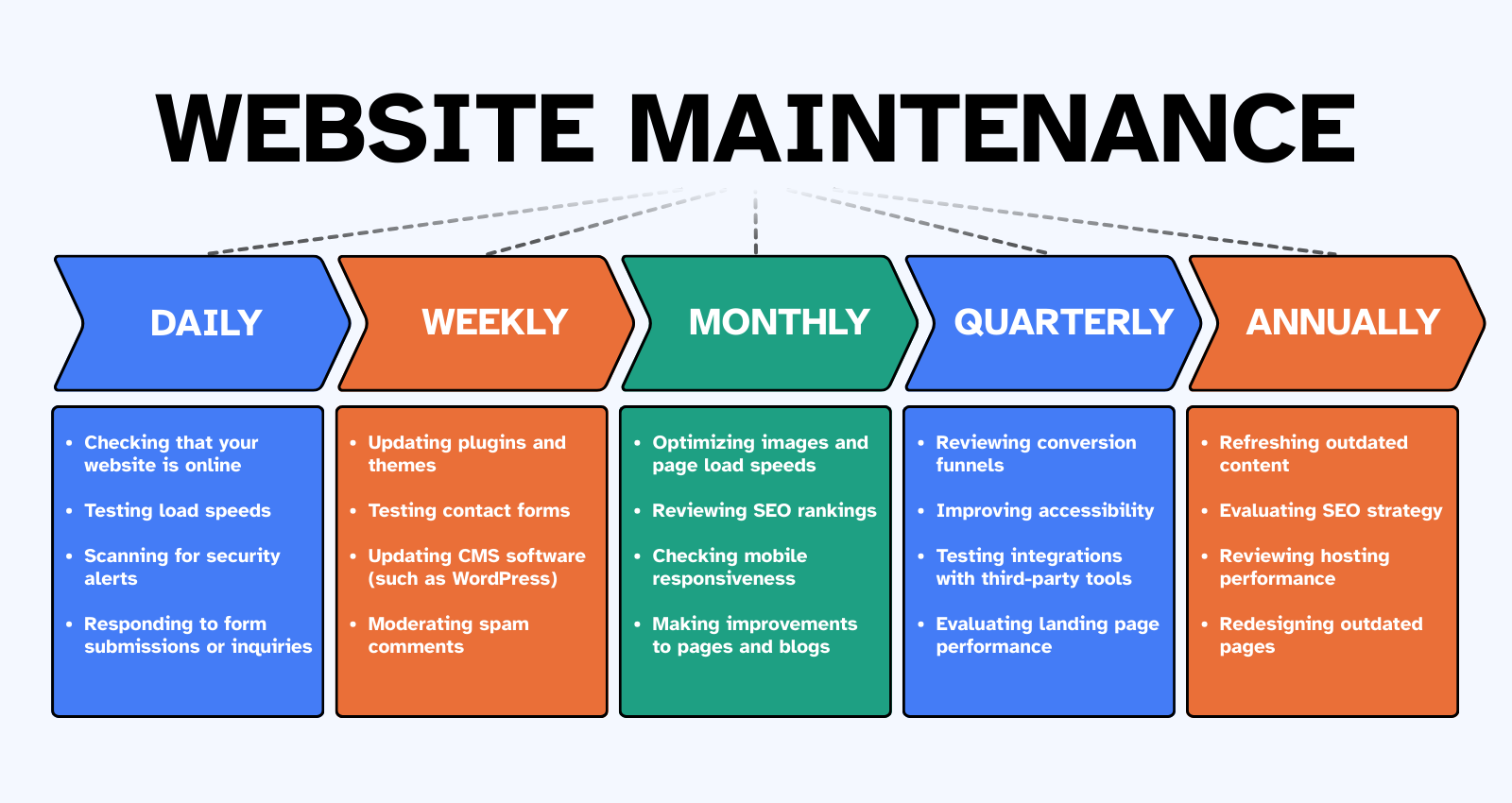
A good maintenance routine breaks tasks into manageable schedules. Some tasks should be performed frequently, while others only need attention occasionally. Below is a practical checklist used by many website professionals.
Daily Website Maintenance Tasks
These quick daily checks help catch issues before they become serious problems. In total you should expect to spend about 10-30 minutes a day depending on the complexity of your website. Daily maintenance may include:
- Checking that your website is online
- Testing load speeds
- Scanning for security alerts
- Reviewing traffic spikes in analytics
- Responding to form submissions or inquiries
Weekly Website Maintenance Tasks
Weekly tasks help keep your website functioning smoothly and check for things that aren’t 100% critical to daily operations. Overall, you should expect to spend about an hour or two per week based on the size and functionality of your website. Weekly tasks include:
- Updating plugins and themes
- Updating CMS software (such as WordPress)
- Testing contact forms to ensure they send
- Reviewing recent backups
- Checking for broken links
- Moderating spam comments
Monthly Website Maintenance Tasks
Monthly maintenance focuses on performance, usability, and SEO. Keeping up with these tasks doesn’t just ensure your site works, it will help it thrive. You can expect to spend 5-10 hours per month based on the speed at which you’re looking to grow your website. If you don’t have that much time, don’t worry. Small consistent improvements over time is better than nothing. Start by looking into the following tasks:
- Optimizing page load speeds
- Reviewing Google Analytics data
- Optimizing large images
- Checking mobile responsiveness
- Reviewing search engine rankings
- Auditing page titles and meta descriptions
- Reviewing navigation and internal links
- Making content improvements to pages and blogs
Quarterly Website Maintenance Tasks
Quarterly reviews should be a time when you take a step back and really evaluate how well your website supports your business. Is the content performing well? What elements are not working or are holding you back? Has the business changed products or services that are not on the website? It’s the perfect time to ask questions and look at tasks such as:
- Reviewing conversion funnels
- Removing unused plugins or software
- Improving accessibility
- Reviewing website design elements
- Testing integrations with third-party tools
- Evaluating landing page performance
- Adding/removing pages
Annual Website Maintenance Tasks
Once per year, businesses should conduct a larger review of their entire website. This is where you may choose to compare it to previous year’s performance and really gauge how well it’s performing. Annual tasks might include:
- Refreshing outdated content
- Reviewing hosting performance
- Updating legal pages and policies
- Auditing security practices
- Redesigning outdated pages
- Evaluating SEO strategy
DIY Website Maintenance vs Hiring a Professional
Many small business owners wonder whether they should maintain their website themselves. If you find yourself at this point in the article and you didn’t have a solid understanding of the checklist above, you should probably look to hire a professional. Whether you do it yourself or hire it out, both options have pros and cons. Let’s take a look at some of those now.
DIY Website Maintenance
- Pros:
- Lower overall monthly cost
- Full control over your website
- Cons:
- Requires technical knowledge
- Tme consuming
- Higher risk of mistakes
Hiring a Professional for Website Maintenance
- Pros:
- Proactive monitoring
- Faster issue resolution
- Security expertise
- More consistent updates
- Cons:
- Monthly Service Cost
For many small businesses, outsourcing maintenance allows them to focus on running their company instead of troubleshooting technical issues. Not to mention if something does happen, you have a team of experts to fall back on for a resolution. If you’re DIY and something happens, now you’re stuck fixing it yourself or hiring emergency help that is often far more expensive.
Tools That Help Simplify Website Maintenance
If you are considering DIY or are just more curious about how website maintenance happens, this section is for you. There are several tools available on the market today that can make maintaining a website significantly easier. Some of the most popular tools include: Wordfence, Sucuri, PageSpeed Insights, UpdraftPlus, Pingdom, Google Analytics, and GeoPeeker. These tools automate many tasks and, in most cases, will even notify you when something needs attention. They’re not fool proof and often require at least a rudimentary technical understanding to operate.
If you don’t feel you have this level of understanding, consider hiring a professional to complete regular website maintenance services.
Common Website Maintenance Mistakes
Many businesses unintentionally neglect their websites after launch. Often feeling that the website launch was the finish line, when in fact, it was the starting line. Here are some common mistakes we see that you should work to avoid:
Ignoring Software Updates
Outdated plugins and software create security risks. Ignore them for too long and your website will eventually get attacked.
Not Creating Regular Backups
Without backups, recovering from a problem can be extremely difficult, sometimes impossible. Maintaining a daily backup is recommended.
Keeping Outdated Content
Old content reduces credibility and search rankings. If you have outdated content that is underperforming, consider removing it.
Never Checking Analytics
Analytics reveal how visitors interact with your website and highlight opportunities for improvement. Check your analytics and use them as a learning opportunity to make changes that will satisfy future visitors.
Ignoring Mobile Performance
Regardless of your industry a large percentage of website traffic now comes from mobile devices. If you are not looking at how your site performs on phones and tablets, you may be alienating a large portion of your audience.
Final Thoughts
Your website is one of the most valuable digital assets your business owns. It gives potential customers a first impression of your business and is often the difference between an average business and a great one. Like any important asset, it requires regular care. As soon as you’re done reading this you should create a structured website maintenance routine or start searching for professionals. Either option will ensure your site remains fast, reliable, secure, optimized for search engines, and ready to convert visitors into customers. Delivering value to your business for years to come.